What Is a Runtime?
To understand how JavaScript is run, we need to first describe what a runtime is. A runtime can be described, in a non-technical way, as a program that runs programs.
When talking about JavaScript specifically, we can call out some well-known runtimes:
- Browser runtimes (using engines like V8, SpiderMonkey, etc.)
- Node (server-side, uses V8)
- Deno (server-side, uses V8)
- Bun (server-side, uses JavaScriptCore)
The last three are server-side alternatives to the "original" browser runtime.
Agents (Not the Boring Ones)
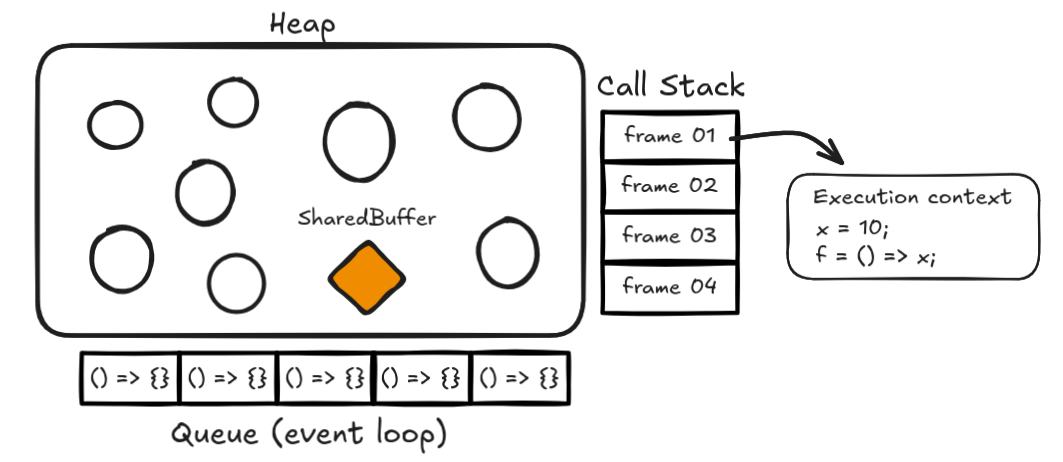
Each autonomous executor of JavaScript is called an agent, which maintains its own structures for code execution, such as:
- Heap
- Queue (for tasks and microtasks)
- Stack
Heap
The heap is not an unknown concept to anyone slightly familiar with computer science. It is basically a large unstructured region of memory that gets populated with objects as needed. As we are talking about multiple agents, notice that in a shared memory context, each agent has its own heap with a SharedArrayBuffer object that provides a way of passing data between different agents.
Event Loop and Queues
The event loop is the mechanism that coordinates interactions between the call stack and the task queues, which enables async programming. While JavaScript is single-threaded, the event loop allows it to perform non-blocking operations by offloading tasks (jobs) to the runtime APIs and processing their callbacks when they complete.
A job is a unit of work that is queued to be executed asynchronously. It is scheduled to be run later, not immediately in the current execution context. There are two main types of jobs:
- Microtasks: Higher priority
- Promise callbacks (e.g. .then(), .catch())
- MacroTasks: Lower priority
- setTimeout, setInterval, etc.
Stack
Also known as the call stack, the stack works with changing control flows by entering and exiting execution contexts (blocks of code). It follows a last-in-first-out (no way) structure, and every function call pushes a new entry onto the stack.
When a function is called, a new frame is pushed onto the stack containing the function's arguments, local variables, and return address. When the function returns, its frame is popped off the stack, and execution continues from where it was called.
If the stack grows too large (usually from infinite recursion or deeply nested function calls), you'll encounter the famous "Maximum call stack size exceeded" error. This is why recursive functions need proper base cases or some kind of optimization to prevent stack overflow.
Execution Contexts
Each job enters by calling its own callback. Code inside this callback may create variables, call functions, etc. Each function needs to keep track of its own variables and where to return to. To handle this, the agent needs the stack to keep track of the execution context (stack frame). Let's take a look at the following code and track its execution on the stack:
function foo(b) {
  const a = 10;
  return a + b + 11;
}

function bar(x) {
  const y = 3;
  return foo(x * y);
}

const baz = bar(7); // assigns 42 to baz- The job starts; the first frame and the variables
foo,bar, andbazare defined. It callsbarwith the argument7. - A second frame is created for the
barcall, containing bindings for the parameterxand also for the local variabley. It performs the multiplication and callsfoowith its result. - A third frame is created for the
foocall containing bindings for the parameterband the local variablea. The frame ends by returning the result of thea + b + 11operation. fooreturns, and the top frame element is popped off. The call expressionfoo(x * y)resolves to the return value.barreturns; its frame is also popped off, and the call expressionbar(7)resolves to the return value.- End of execution, now the stack is empty.
Notice that when a frame is popped, it is not necessarily gone forever. Sometimes, the content of the frame will still be needed, for example, in functions that use generators:
function* gen() {
  console.log(1);
  yield;
  console.log(2);
}

const g = gen();
g.next(); // logs 1
g.next(); // logs 2
gen() creates an execution context that is suspended for future execution; none of its code is executed yet. Notice that after the g.next() call, the yield construct also suspends the execution context.
Tail calls
We've already covered the stack and the possibility of a stack overflow error. A function call is a tail call if the caller does nothing after the call except return the value, something quite common in recursive functions.
function factorial(n, acc = 1) {
  if (n <= 1) return acc;
  return factorial(n - 1, n * acc);
}
In the example above, the factorial function uses a tail call because the recursive call is the last operation performed - there's nothing left to do after it returns. The runtime can optimize this by replacing the current stack frame with the new one instead of creating a new frame on top of it. This keeps memory usage constant regardless of how deep the recursion goes, effectively preventing stack overflow errors. Check the image below for a visual comparison:
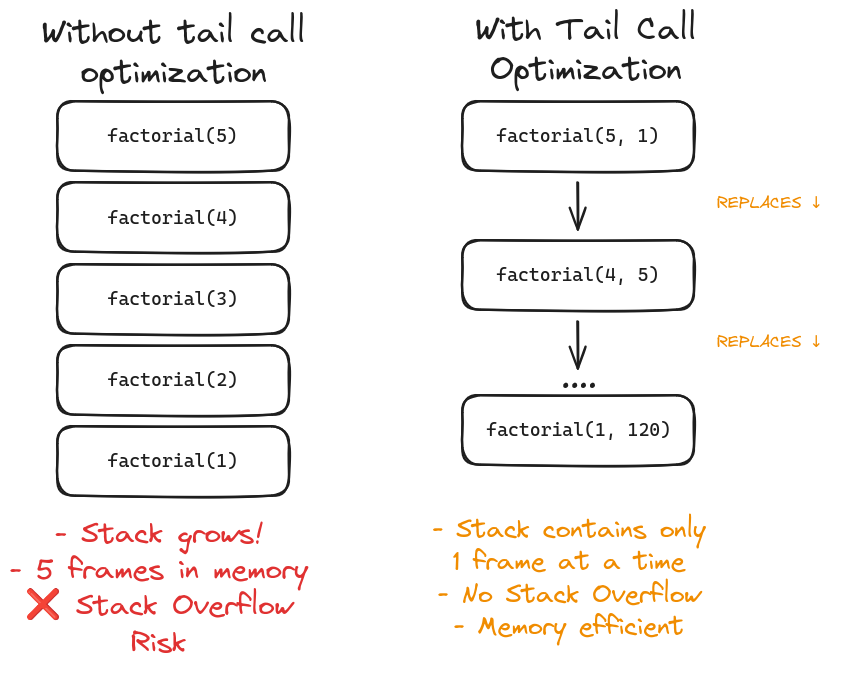
Note: While tail call optimization is part of the ECMAScript specs, most js engines don't implement it. The example above would still cause stack overlows with larger inputs in most environments
Never blocking
One of the most important attributes of the event loop is its non-blocking nature. Handling things like I/O is typically performed via callbacks, so when the application is waiting for a query or a fetch to return, it can still process other code.
The code executed after the completion of an asynchronous action is always provided as a callback function (e.g., .then()) which defines a new job to be added to the job queue. This characteristic requires the whole platform to be inherently asynchronous (except for some legacy APIs).
Why All of This Matters
The event loop's non-blocking nature, combined with the call stack's execution context management, enables JavaScript to handle asynchronous operations despite being single-threaded.
By understanding how execution contexts are created and destroyed, and how optimizations like tail call optimization work, you can write more performant code and better debug issues when they arise.
Also, is cool :)